Order ready screen
An order ready screen for a small cafe, on the TV you already have
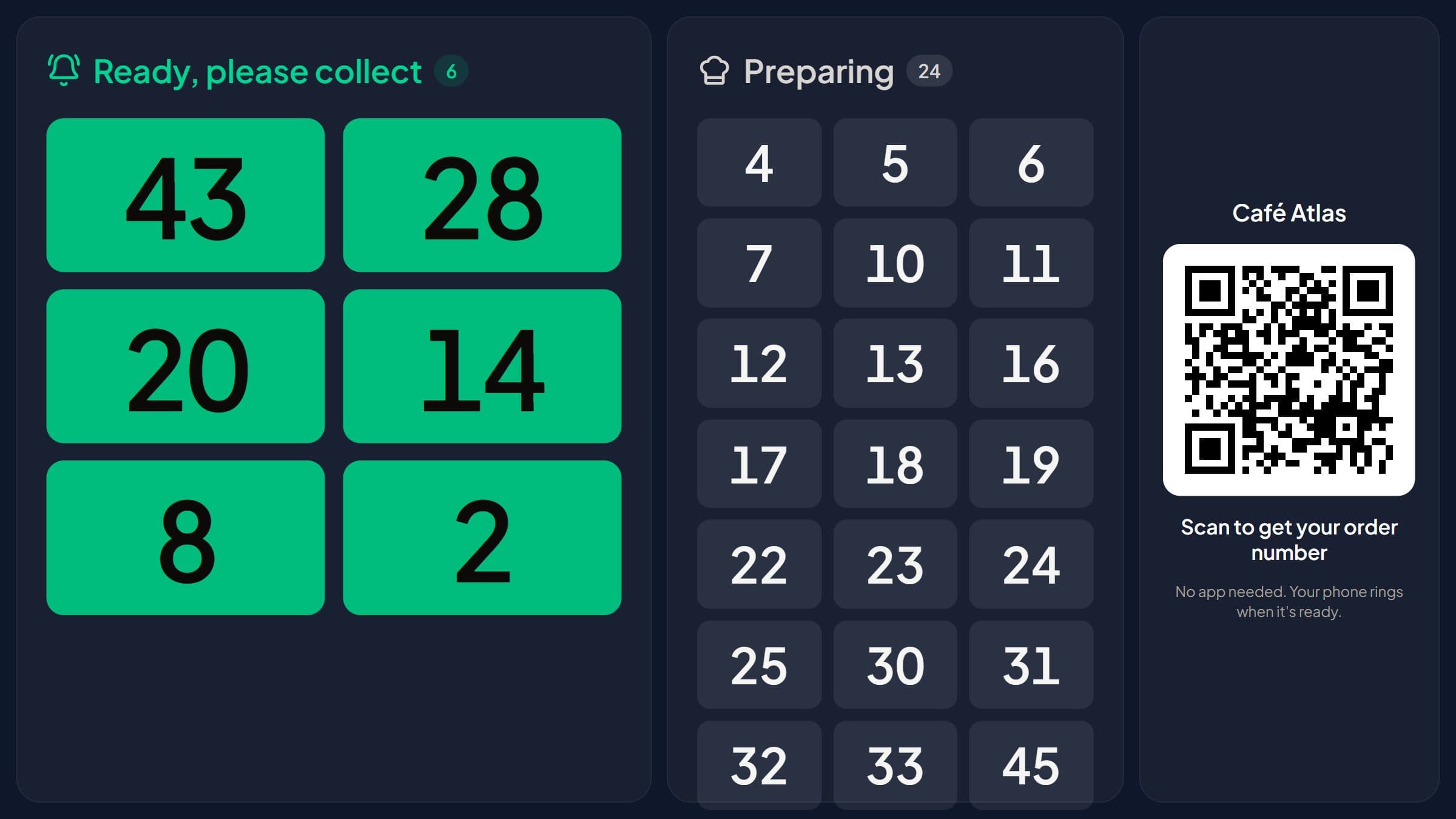
Stampylo is an order ready screen for a small cafe or counter-service spot. Open one link in your TV's browser and it shows the orders being prepared and the ones ready, then calls each ready number out loud. The cashier or the kitchen taps Ready, and the customer's phone rings too. It costs $15 a month, and you can try it free for 14 days without a card.
14-day free trial, no credit card.
| Criterion | Stampylo | Enterprise order ready systems (Till, Ordering Stack) |
|---|---|---|
| Screen | Any Smart TV or Android TV with a browser | Till's order ready screens page describes its own display hardware (checked on 2026-10-23) |
| Price | $15 a month, public | Till: demo request on the screens page; pricing page shows a typical £29-99/month plus about £1,500-£3,000 of hardware, customized (checked on 2026-10-23) |
| Who marks orders ready | Cashier screen, or kitchen screen if you choose, tap Ready | Comes from the POS and kitchen systems |
| POS integration | None | Integrated with the POS (both vendors' pages, checked on 2026-10-23) |
| Voice call of ready numbers | Yes, English, French or Arabic | Not compared here |
| Customer phone alert | Yes, from the counter QR code | Not described on those pages |
| Free trial | 14 days, no card | Not stated (Till offers a demo) |
Why most order ready displays don't fit a small cafe
Search for an order ready display and most of what you find is built for chains. Till's order ready screens page describes its own display hardware and says the screens sync with point of sale and kitchen systems. That page shows no price, only a demo request. Till's pricing page gives a typical starting cost of £29-99 a month plus about £1,500-£3,000 of recommended hardware, with pricing customized (checked on 2026-10-23). Ordering Stack says its status screen is fully integrated with the designated POS system and shows orders from its self-service kiosks (checked on 2026-10-23).
That makes sense for a chain with a kitchen display system. A small cafe usually has one register, one person on the espresso machine, and a line at lunch. You need the customer to know their order is ready without anyone shouting names or handing out buzzers and pagers.
How the order ready screen for a small cafe works
Nobody installs an app, not you and not your customers. Everything runs in the browser.
- The customer pays at the counter, then scans the counter QR code with the phone camera. You get a printable poster in English, French or Arabic.
- Their phone shows an order number for the day, how many orders are ahead, and an estimated wait based on your average preparation time.
- The TV shows two columns, Preparing and Ready, with your business name, your logo and the counter QR code.
- When the order is done, the cashier taps Ready on the cashier screen (any tablet or phone, opened by a link, no password). If you prefer, the kitchen gets its own screen and marks orders ready itself.
- The TV plays a chime and announces the number out loud in English, French or Arabic. You can choose one language or several.
- Unlimited orders and screens. The cashier screen link can be revoked at any time.
What TV you need for an order ready screen
Any Smart TV or Android TV with a web browser works. There is no box to buy from us.
Open the TV's browser and go to stampylo.com/tv. The page shows a pairing code. Pair it with your Stampylo account and the screen is set. If the connection drops, the TV reconnects by itself.
What the customer's phone does
The TV is the now serving screen for the room. The phone is the backup for people who step outside or sit down. Here is exactly what happens, phone by phone.
- Android: the ticket page rings and vibrates, and a push notification arrives.
- iPhone: the ticket page rings only while it stays open on screen. The "Enable alert" button keeps the screen on with a loud alarm. A push notification arrives only if the customer added the page to the home screen.
- A customer who saved your stamp card through WhatsApp also gets one WhatsApp "order ready" message.
Customers without a smartphone, and order numbers that match your register
Not everyone scans. For a customer without a smartphone, the cashier creates a ticket in one tap and the number shows on the TV like any other.
Order numbers start at 1 each day. If you would rather match your register, you can set the first number of the day, use "next number", or let the cashier type the receipt number.
Worried someone will photograph the counter QR and use it from home? Turn on the optional QR that changes every 30 seconds on your screens. A photo of it stops working within a minute.
Price and how a business outside Morocco starts today
One plan: $15 a month, $39 for 3 months, or $149 a year. No hardware to buy and no per-order fee.
Stampylo started in Morocco, and you can use it from the US, the UK, Canada or Australia today. Start the 14-day free trial with no card. After the trial, you pay by international bank transfer in USD (or EUR), or with a prepaid activation code. We help you set it up on WhatsApp. There is no online card checkout yet.
What it does not do yet
Better to know before you start.
- No POS integration. Stampylo does not connect to Square, Toast or any other POS. Your staff tap Ready on the cashier or kitchen screen.
- No online card payment and no Apple Pay for the subscription.
- No online ordering and no SMS. The customer orders and pays at your counter as usual.
- No Apple Wallet card yet. Google Wallet works.
- On iPhone the ticket rings only while the page stays open, as explained above.
The same subscription includes a punch card
The screen comes with a digital stamp card in the same plan. You choose the deal, for example buy 9 coffees and get 1 free. A stamp is added only when an order is marked Ready, so there is no stamp without a real order. Customers save the card with one WhatsApp message or add it to Google Wallet, and redeem the reward at the counter with a 6-digit code.
Questions
Do I need to buy a special screen?
No. Any Smart TV or Android TV with a browser works. Open stampylo.com/tv on the TV to check.
Does it connect to my Square or Toast POS?
No. There is no POS integration. Staff tap Ready on the cashier or kitchen screen.
Does the TV call the numbers out loud?
Yes. It plays a chime and announces each ready number in English, French or Arabic.
Will an iPhone ring when the order is ready?
Only while the ticket page stays open on screen. "Enable alert" keeps the screen on with a loud alarm. Android rings and vibrates.
How do I pay from the US, UK, Canada or Australia?
Start the 14-day free trial with no card. Then pay by international bank transfer in USD (or EUR) or with a prepaid activation code. We help you set it up on WhatsApp.
How much does it cost?
$15 a month, $39 for 3 months or $149 a year, with unlimited orders and screens.
An order ready screen for a small cafe, on the TV you already have
Free trial14-day free trial, no credit card.