Restaurant pager app
A restaurant pager app with no hardware, built for counter pickup
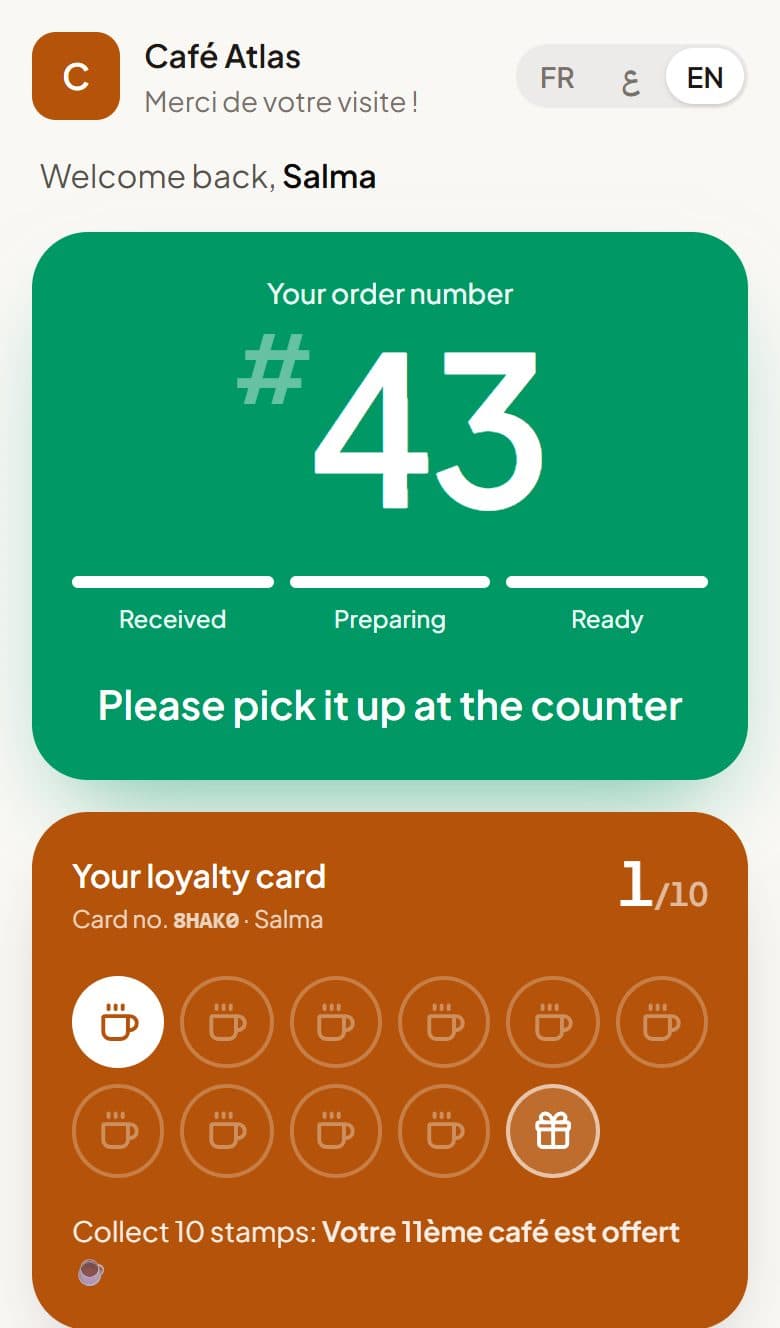
Stampylo is a restaurant pager app with no hardware to buy and no app to install. The customer pays, scans a QR code at the counter, and gets an order number on their phone. When you tap Ready, the phone rings. Once the order is marked Ready, a stamp is added to their digital punch card.
14-day free trial, no credit card.
| Criterion | Stampylo | SMS waitlist tool (e.g., TablesReady) | Hardware buzzers |
|---|---|---|---|
| Built for | Counter pickup after paying | Waitlists first; pick-up order texts through its Square integration (checked on 2026-10-23) | Counter or table |
| Hardware to buy | None (any tablet or phone; TV optional) | None | Buzzer set and charging base |
| How the customer is alerted | Phone rings in the browser; push; one WhatsApp message if the card is saved | Text message | Buzzer vibrates and flashes |
| Message limits | No SMS; ready alerts have no cap | Monthly message limit per plan | None |
| Punch card in the same scan | Yes | Not checked | No |
| iPhone | Rings while the ticket page is open | Text arrives like any SMS | No phone needed |
| Price | $15 per month, 14-day free trial | Paid plans from $39 a month billed annually; free plan with 150 messages a month (checked on 2026-10-23) | One-time purchase |
Why a restaurant pager app with no hardware fits counter service
Plastic buzzers cost money up front, get lost, need charging, and have to be wiped down. Many pager apps are built around table waitlists: a host adds a name to a list and the guest gets a text when the table is free.
A café or quick-service counter works differently. People pay first, then wait a few minutes for their order. Stampylo is made for that pay-first, wait-a-few-minutes line. There is nothing to hand out and nothing to collect back.
How it works at the counter
You print the counter QR poster (in English, French, or Arabic) and open the cashier screen on any tablet or phone. The screen opens from a private link, with no password, and you can revoke that link at any time.
- The customer pays first, then scans the QR with the phone camera. No app to download.
- They get an order number for the day. Their ticket page shows the status, how many orders are ahead, and an estimated wait based on your average preparation time.
- When the order is ready, the cashier taps Ready. If you prefer, the kitchen marks orders ready on its own kitchen screen.
- The customer's phone rings. On Android it also vibrates and gets a push notification.
- No smartphone? The cashier creates a ticket in one tap and the number shows on the TV.
A virtual pager for restaurants that also runs your punch card
With Stampylo, one scan does two jobs: it pages the customer and counts their visit on the punch card.
You choose the rule, for example buy 9, get 1 free, and the reward. There is one reward per business, with no points and no tiers. A stamp is added only when the order is confirmed Ready, so there is no stamp without a real order. Rewards are redeemed at the counter with a 6-digit code.
The customer can save the card with one WhatsApp message or add it to Google Wallet, where it updates by itself. Customers whose card is saved on WhatsApp also get one "order ready" WhatsApp message.
Does a restaurant pager app ring on iPhone and Android?
Android and iPhone do not behave the same in the browser, so here is exactly what happens.
- Android: the phone rings and vibrates, and a push notification arrives.
- iPhone: the ticket page rings only while it stays open on screen. The "Enable alert" button keeps the screen on and plays a loud alarm when the order is ready.
- iPhone push notifications arrive only if the customer added the page to the home screen.
- For anyone who misses the alert, the TV screen shows the number in the Ready column and can announce it out loud.
A restaurant buzzer alternative with no SMS fees
Stampylo does not send text messages, so ready alerts have no SMS bill and no monthly cap. Alerts go through the browser, push notifications, and, for customers who saved their card there, one WhatsApp message.
SMS waitlist tools work differently. TablesReady, for example, calls itself "the waitlist app for busy restaurants" and texts guests when their table is ready. Its paid plans start at $39 a month, billed annually, and its free plan includes 150 messages a month per location. Its pricing page says texting pauses when you reach your monthly limit unless you buy more messages (tablesready.com, checked on 2026-10-23).
Order-ready TV screen and a QR code that can't be reused from a photo
Any Smart TV or Android TV browser can show your order board. You can also open stampylo.com/tv on the TV to get a pairing code.
- Two columns, Preparing and Ready, plus a chime and a voice announcement of each ready number in English, French, or Arabic.
- Your business name, logo, and the counter QR on screen.
- It reconnects by itself if the connection drops.
- Optional: a QR that changes every 30 seconds, so a photo of it stops working within a minute.
- Order numbers can start at 1 each day or match the numbers on your register: set the first number of the day, the next number, or let the cashier type the receipt number.
Price and how a US business starts
One plan with unlimited orders, screens, and customers: $15 per month, $39 for 3 months, or $149 per year. Start with a 14-day free trial, no card needed.
Here is how a US business starts today: begin the free trial, then pay by international bank transfer in USD or EUR, or with a prepaid activation code. We help you on WhatsApp. Online card payment is not available yet.
What Stampylo does not do (yet)
Stampylo does a few things well and leaves others out on purpose. Check these before you switch.
- No POS integration (Square, Toast, and others). The cashier taps Ready on Stampylo's screen.
- Apple Wallet is not available yet. Google Wallet and WhatsApp work today.
- iPhone rings only while the ticket page is open on screen.
- No SMS, no online ordering, and no table waitlist or reservations.
Questions
Do customers need to install an app?
No. They scan the counter QR with the phone camera and the ticket opens in the browser on Android or iPhone.
Does it ring on iPhone?
Yes, while the ticket page stays open on screen. "Enable alert" keeps the screen on with a loud alarm. Push notifications on iPhone need the page added to the home screen.
Are there SMS fees?
No. Stampylo does not send SMS, so ready alerts have no SMS bill and no monthly cap.
Does it connect to Square or Toast?
No. There is no POS integration. The cashier taps Ready on Stampylo's own screen, and order numbers can match your register.
How does a US business pay?
Start the 14-day free trial with no card. After that, pay by international bank transfer in USD or EUR, or with a prepaid activation code. We help on WhatsApp.
Can the card go in Apple Wallet?
Not yet. Customers can save the card by WhatsApp or add it to Google Wallet.
A restaurant pager app with no hardware, built for counter pickup
Free trial14-day free trial, no credit card.