Software for snack bars and fast food
Software for snack bars and fast food: one tool at the counter
Software for snack bars and fast food does not need to do everything. It needs to fix what happens at the counter: who is waiting for what, when it is ready, and why the customer comes back. Stampylo does exactly that for a snack bar, a tacos shop, a sandwich or burger counter, in the browser, with no app to install. Here is what it does, what it does not do, and a checklist to set it up in one afternoon.
14-day free trial, no credit card.
| At the counter | No tool (shouting numbers, paper card) | With Stampylo |
|---|---|---|
| Knowing when it is ready | Customer waits at the counter and asks | Number on the TV, phone rings |
| Calling numbers | Shouting across the room | Chime and voice announcement on the TV |
| Loyalty card | Paper card, lost or stamped twice | Stamp only when the order is Ready |
| Bringing customers back | Nothing once they leave | WhatsApp reminder to customers who stopped coming |
| Google reviews | Forgetting to ask | Invitation after the visit |
| Taking payment | Your till | Your till (Stampylo does not take payments) |
What a snack bar really needs at the counter
In a snack bar, taking payment is not the problem: you already have a till, or a notebook. The problem is the time between paying and getting the sandwich. Customers crowd the counter, ask "is it ready?", and someone shouts numbers that half the room cannot hear.
The second problem is coming back. A happy customer does not always return, and a paper loyalty card gets lost or stamped twice. Stampylo covers these two moments, and nothing else.
The customer's path, from payment to sandwich
Everything happens on the customer's phone, with the camera, no app.
- The customer pays first, then scans the counter QR code (a printable A4 poster in French, Arabic and English).
- They get an order number for the day. Their page shows the status, how many orders are ahead and an estimated wait, based on your average preparation time.
- Their number shows on the TV in the "Preparing" column.
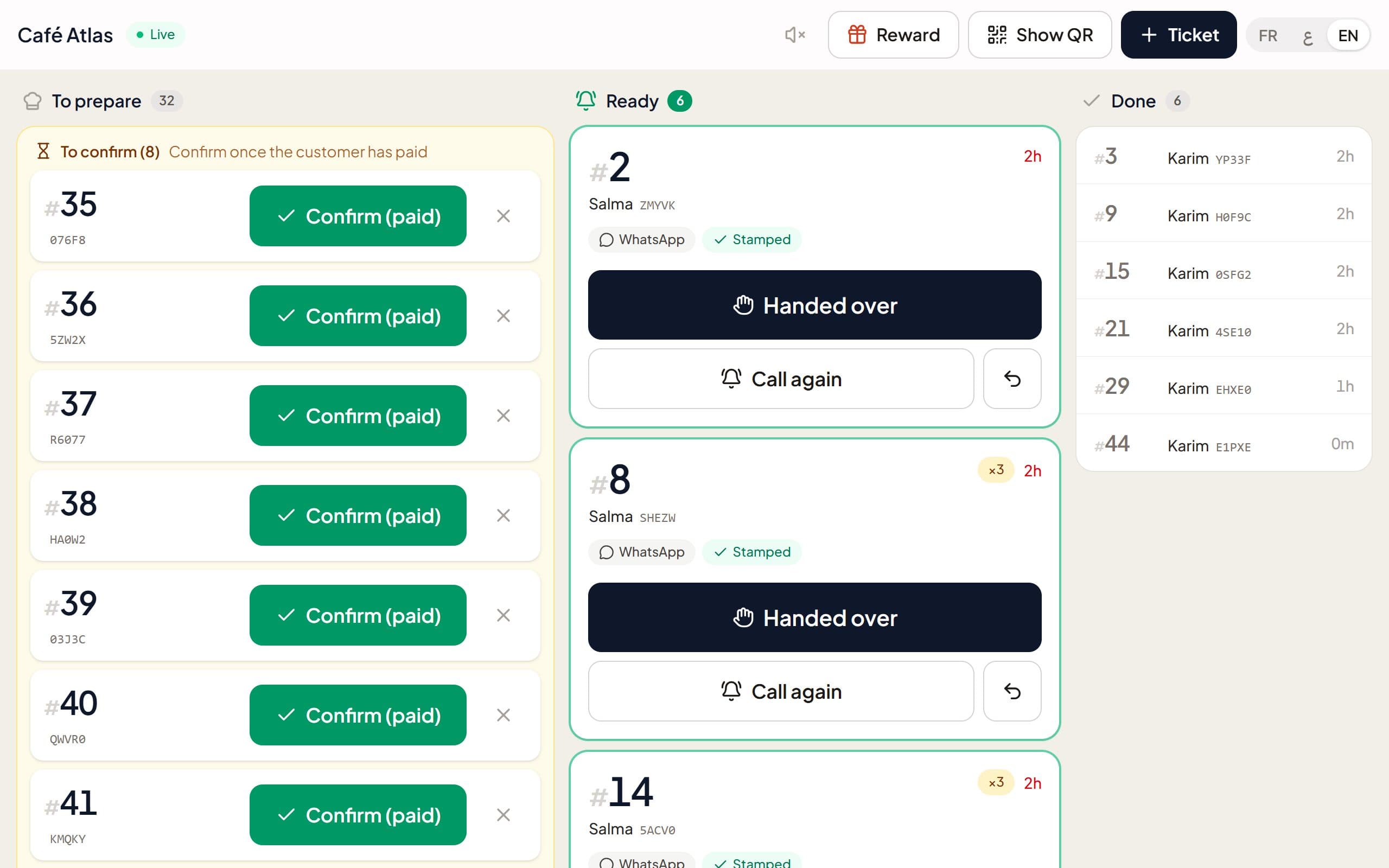
- When the order is ready, someone taps "Ready" on the cashier screen, or on the kitchen screen if you choose to let the kitchen mark orders ready.
- The number moves to the "Ready" column on the TV, with a chime and a voice announcement in Arabic, French or English.
- The customer's phone rings and vibrates on Android. On iPhone, the page rings only while it stays open on screen: the "Enable alert" button keeps the screen on with a loud alarm.
The screens: cashier, kitchen and TV
The cashier screen opens on any tablet or phone from a link, with no password. You can revoke that link at any time. A customer without a smartphone? The cashier creates a ticket in one tap and the number shows on the TV.
The kitchen screen is optional: if your cooks prefer to mark orders ready themselves, they do it on their side and nobody has to shout from the counter.
The TV is any Smart TV or Android TV with a browser, or stampylo.com/tv, which shows a code to pair it. It shows the counter QR, your business name and logo, and reconnects by itself. Order numbers can start at 1 each day or follow your till.
Snack bar stamp card, kebab punch card
The loyalty card is a digital stamp card: "buy N, get 1 free". You choose N and the reward, for example a tacos, a kebab sandwich or a meal. One reward per business, no points, no tiers.
A stamp is added only when the order is confirmed Ready: no stamp without a real order. Every action is logged with the screen link that did it, and a daily check flags abnormal days. The reward is redeemed at the counter with a 6-digit code.
Customers save their card with one WhatsApp message and can add it to Google Wallet, where it updates itself. Apple Wallet is not available yet.
WhatsApp and Google reviews, without effort
- A customer whose card is saved on WhatsApp also gets an "order ready" message.
- An automatic reminder goes to customers who stopped coming. They can stop messages any time.
- Offers go only to customers who accepted marketing messages, at most one a week, using credit packs.
- Optional birthday gift: it asks only for the day and month.
- After a visit, the customer is invited to leave a Google review. The Google button shows first for everyone, then an optional private rating only you see. Never a stamp or gift in exchange for a review.
What Stampylo is not
To pick the right tool, you need to know what it does not do. Stampylo sits next to the way you take payment; it does not replace it.
- It is not a till or POS: it does not take payments and does not connect to any POS.
- No online ordering and no QR menu: the customer orders and pays at the counter, as today.
- No delivery.
- No SMS and no hardware to buy: a tablet or phone is enough, the TV is optional.
Snack bar setup checklist for one afternoon
A simple list to be ready before the evening service. You get a 14-day free trial, no card needed.
- Create your account, add the snack bar's name and logo.
- Enter your average preparation time for the estimated wait.
- Choose numbering: from 1 each day, or your till's numbers.
- Set up the card: the number of stamps N and the reward.
- Print the A4 QR poster and put it by the till.
- Open the cashier screen link on a tablet or phone, and the kitchen screen if you need it.
- Open the TV in its browser, or pair it with stampylo.com/tv.
- Add the link to your Google review page.
- Place a test order with your own phone, from scan to ring.
Price and payment
One plan, with unlimited orders, screens and customers: MAD 149 per month, MAD 399 for 3 months or MAD 1,490 per year. In Morocco you pay by bank transfer from the dashboard or with a prepaid activation code. The dashboard shows visits, stamps, rewards, returning customers and private ratings, with a short summary email every Monday.
Questions
Does Stampylo replace my till?
No. Stampylo does not take payments and does not connect to any POS. It handles the wait, calling numbers, the stamp card, WhatsApp and Google reviews. Order numbers can follow your till.
Do my customers need to install an app?
No. They scan the QR code with the camera and everything opens in the browser, on Android and iPhone.
Does the phone ring on iPhone too?
Yes, but only while the page stays open on screen. The "Enable alert" button keeps the screen on with a loud alarm. On Android the phone rings and vibrates.
Can customers order online or get delivery?
No. No online ordering, no QR menu, no delivery. The customer orders and pays at the counter, then scans the QR.
What about a customer without a smartphone?
The cashier creates a ticket in one tap and the number shows on the TV.
How long does setup take?
One afternoon is enough: account, stamp card, printed poster, cashier screen on a tablet and the TV in its browser. No hardware to buy.
Software for snack bars and fast food: one tool at the counter
Free trial14-day free trial, no credit card.